Python
- High-level programming language
- Created by Guido van Rossum
- First released in 1991
- Latest version: 3.10, released in 2021-10-04
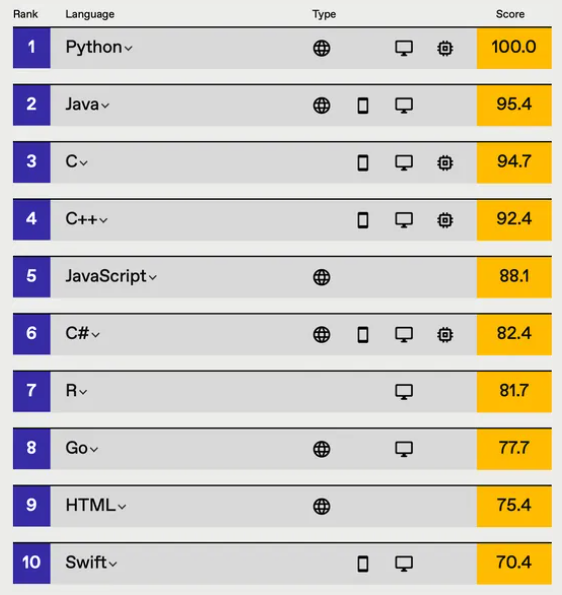
Top Programming Language 2021
Uses
- Create Web applications (e.g. Netflix, Uber, Dropbox)
- Create Workflows
- Connect to Database
- Handle Big Data and Perform Complex Mathematics.
- Rapid prototyping or for production-ready software development.
Where to code?
Basic Text Editor and Command line
Notepad++, Sublime Text 3 and Visual Studio Code


Variable

Declare variable by assigning a value to label.
Note: variables are case-sensitive and you cannot start variable name with a number
							my_name = "Khang Hou"
							MY_NAME = "Khang Hou" # Different variable than above
							1clap2clap = "Clap" # Python will throw an error
Commonly Used Data Types
- Text: string - "Hello there"
- Numbers: int, float - 69
- Boolean: bool - True or False
- Sequence: list - [1, 2, 3]
- Mapping: dict - {name: "Bobby"}
Example
							# string
							x = "a" + "random string" # Output: "arandom string"
							print(x[3]) # guess this value

							#int
							y = 5

							#float
							pie = 3.15

							#boolean
							covid = False

							#checking datatype
							type(covid)

							#list
							mylist = ["apple", "banana", "cherry"]

							#dictionary
							x = {"name" : "John", "age" : 36}
Summary
strings - denoted by double or single quotes (" " or ' ')
numbers - denoted by numbers
booleans - denoted by either a True or False
lists - denoted by square brackets with zero or more elements inside
dictionaries - denoted by curly braces, with string and value pairs
Operators
+ is add
- is minus
* is multiply
/ is divide
+
Adding numbers
							1 + 1 # Output: 2
							169 + 420 # Output: ?
Concatenating strings
							"rain" + "bow" # Output: rainbow
							"You are " + str(3) + " years old today" # Python only accepts concatenation between strings.
-
Subtracting numbers
							10 - 5 # Output: 5
							0 - 10 # Output: -10
*
Multiplying numbers
5 * 5 # Output: 25
Multiplying numbers by a power
5 ** 2 # Equivalent to 5^2
/
Dividing numbers
							4 / 2 # Output: 2.0
							7 / 2 # Output: 3.5
							2 / 3 # Output: 0.6666666666666666
Questions
							x = 100
							y = "Happy"
							age = 10
							z = 557

							print(900 + x)
							print("I am " + y)
							print("I am " + y + " and I am " + str(age) + " years old today")
							print(900 * z)
							print(1000 / 557)
if else
Supports the use of logical conditional statements
- Logical condition
- Equal: a == b
- Not Equal: a != b
- Less than: a < b
- Less Than or Equal To: a <= b
- Greater than: a > b
- Greater Than or Equal To: a >= b
if: The first condition to be checked
elif: If the previous condition were not true, try this condition
else: Anything that were not caught by the preceding conditions
Example
if today == "Saturday": print("No School") elif today == "Sunday" or tomorrow == "Public Holiday": print("No School") else: print("Going To School")today = "Saturday"
Output: "No School"
today = "Home-Based Learning"
tomorrow = "Public Holiday"Output: "No School"
today = "Monday"
tomorrow = "Weekday"Output: "Going to School"
List
Array can hold many values under a single variable. Lists are ordered and allow duplicate values
Example
								# declaring List
								thislist = ["apple", "banana", "cherry", "apple", "cherry"]
									print(thislist[0])
									Output: "apple"


								Question: What is the output of print(thislist[1])?
									print(len(thislist))
									Output: 5


								Question: What is the output of print(thislist[-4])?
									print(thislist[-1])
									Output: "cherry"


								Question: What is the output of print(thislist[-4])?
									print(thislist[2:4])
									Output: ["cherry", "apple"]


								Note: This is called index slicing and it gets the value at index 2 to 3 but it always excludes the last number


								Question (Tricky): What is the output of print(thislist[2:2])?
										print(thislist[:-1])
										Output: ["apple", "banana", "cherry", "apple"]


									Note: [:-1] is equivalent to [0:-1], meaning to take every element in the list except for the last one. print(thislist[:]) would print out everything


									Question (Hard): What is the output of print(thislist[-2:])?
										thislist.append("mango")
										thislist.insert(1, "orange")
										thislist.remove("cherry")
										thislist.pop(1)
										print(thislist)


									After Insertion: ['apple', 'orange', 'banana', 'cherry', 'apple', 'cherry', 'mango']


									After Deletion: ['apple', 'banana', 'apple', 'cherry', 'mango']


									Note: Removed "banana" first, then the first instance of "cherry"
For Loop
To iterate over a sequence that is either a list, dictionary or string
Example 1
							for i in range(3):
								print(i) # Prints 0, 1 and 2

							for i in range(2,6):
								print(i) # Prints numbers 2 to 5


							cars = ["Ford", "Volvo", "BMW"]
							for car in cars:
								print(car)
Example 2
						# value from 1 to 11 but not including 11
						# increment by 2 each time
						for i in range(1,11,2):
							print(i)
							# 1,3,5,7,9

						for i in range(5, 0, -1):
							print(i) # Prints numbers 5 to 1
Questions
							# Question 1
							for i in range(5):
								print(i + 1)

							# Question 2
							for i in range(4):
								print(i - 1)

							# Question 3
							for i in range(1, 5):
								print(i)

							# Question 4 (Hard)
							for i in range(10, 0, -2):
								print(i)
Dictionary
Dictionary are used to store data in key-value pairs
A collection which is ordered, changeable and does not allow duplicates
Example
							# declaring a dictionary

							thisAppleProduct = {
								"brand": "Apple",
								"type": "Macbook",
								"year": 2013,
								"year": 2015,
								"color": ["grey", "pink","light grey"]
							}

							print(thisAppleProduct["year"]) # returns 2015

							print(thisAppleProduct.keys())  # returns all the keys
							print(thisAppleProduct.values())  # returns all the value

							#changing specific values
							thisAppleProduct["type"] = "IPhone"
							print(thisAppleProduct["type"]) #return IPhone
Example
								thisAppleProduct =	{
									"brand": "Apple",
									"type": "Macbook",
									"year": 2015
									"color": ["grey", "pink","light grey"]
								}
								thisAppleProduct =	{
									"brand": "Apple",
									"type": "MacbookPro",
									"year": 2015
									"color": ["grey", "pink","light grey"]
								}
								thisAppleProduct =	{
									"brand": "Apple",
									"type": "MacbookPro",
									"color": ["grey", "pink","light grey"]
								}
								thisAppleProduct =	{
									"brand": "Apple",
									"type": "MacbookPro",
									"year": 2020,
									"color": ["grey", "pink","light grey"]
								}
							thisAppleProduct["type"] = "MacbookPro" # changing the value of the key "type"
							del thisAppleProduct["year"] # deleting the key & value of dictionary
							thisAppleProduct["year"] = 2020 # adding key & value to the dictionary
Summary
Before colon: key
After colon: value
dictionary_name["key"] to access the value
dictionary_name.keys() to list all keys
dictionary_name.values() to list all values
Functions
Blocks of code that run only when called
Passes data, known as arguments into the function
Can return the result from the function
Example 1: Basic Function
						def greet():
							print("Hello world")

						greet() # to invoke the function
Example 2: Function with Parameters
							x = "parameter"
							y = "arguments"

							def my_function(arg, param):
								print(arg + " is the same as " + param)
								print(param + " is the same as " + arg)
								print(arg + " and " + param + " are both variables")

							my_function(x, y)
							my_function(y, x)
Example 3: Scope
							number1 = 2
							number2 = 3
							total = 0

							def sum(num1, num2):
								total = num1 + num2

							sum(number1, number2)
							print(total) # Is this 0 or 5?
Example 4: List as argument
							mylist = ["chocolate", "apple", "soda"]

							def shopping(grocerylist):
								for item in grocerylist:
									print("Bought: " + x)

							shopping(mylist)
Class
Class is an object constructor
"Blueprint" for creating object.
Classes can be understood as a Template
Object
An object is a mass-produced copy based on a class blueprint
Example 1
							class Human:
								eyes = 2
								hair = "black"

							#creating the object
							Adam = Human()

							# hair is a property
							print(Adam.hair) # returns black

							#changing the property value
							Adam.hair = "blonde"
							print(Adam.hair) # returns blonde
Example 2
							class Human:
								#assign value for name and age accordingly
								def __init__(self, name, age): # every class function always has 1 default parameter: self, which is the class itself. You can use it to reference the class's variables
									self.name = name
									self.age = age

							person = Human("John",21)
							print(person.name)
Example 3
							class Human:
								#assign value for name and age accordingly
								def __init__(self, name, age):
									self.name = name
									self.age = age

								def greetings(self):
									print("hello there")

							person = Human()
							person.greetings()
Module Imports
Python has some built-in modules, one of them being "random". This module can be used to generate random numbers
							#importing the module into the file
							import random
							#return a number from 0 to 9, including the numbers 0 and 9
							print(random.randint(0,9))
File I/O
File I/O stands for File Input Output.
Used to read and write files. Program is able to read content from a file, parse it, then write its own file
File Names
A file name is the name of a file. Every file has an extension

The filename above would be test.txt, where .txt refers to the file extension
File Directories
Every file has a directory it belongs in

The above directory would be
Windows: C:\\Users\\khanghou\\Documents\\VSCodeProjects\\Python\\teaching-python\\python-advanced\\testing
Mac: /Users/khanghou/Documents/VSCodeProjects/Python/teaching-python/python-advanced/testing
Notice how Windows uses 2 backslashes to separate each folder (\\) while Mac uses 1 forward slash (/) only.
For Windows, to use only 1 backslash, you can add an r at the start of the string like so: r"C:\Users\khanghou\..."
Reading a file
To open a file, you must first find the directory it is located in, then its name
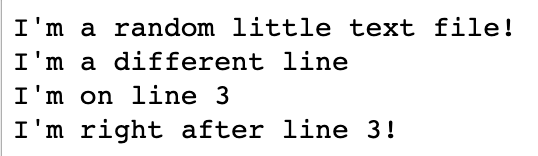
Using the file object, call the read() function
							with open("/Users/khanghou/Documents/VSCodeProjects/Python/teaching-python/python-advanced/testing/test.txt") as file:
								lines = f.read()
								print(lines)
Relative File Directories
The file directories were absolute. Relative file directories start from wherever your current working directory is, which is to say, which folder you are coding in right now
So if your current working directory was already in the testing folder of "/Users/khanghou/Documents/VSCodeProjects/Python/teaching-python/python-advanced/testing", you could just call the text file like so
							with open("test.txt") as file:
								lines = f.read()
								print(lines)
Traversing directories
. - the current folder you're in
.. - the parent folder of the folder you're in
os.getcwd() - returns the folder the program is currently in
os.chdir() - move cwd to the specified directory
Changing Directories
							os.getcwd()
							/Users/khanghou/testing
							os.getcwd()
							/Users/khanghou
							os.getcwd()
							/Users/khanghou/another-folder
							os.getcwd()
							/Users/khanghou/void-folder
							os.getcwd()
							/Users/khanghou/void-folder/abyss/staring
							os.getcwd()
							/Users/khanghou/testing
							os.getcwd()
							/Users/randomuser
							os.chdir("../")
							os.chdir("another-folder")
							os.chdir("../void-folder")
							os.chdir("abyss/staring")
							os.chdir("../../../testing")
							os.chdir("/Users/randomuser")
Writing a file
You add another parameter to the open function, "w". This opens up the file in write mode
							with open("writing-test.txt", "w") as file:
								file.write("Hello friend!!!")
"a": This opens up the file in append mode, so you don't overwrite anything
							with open("writing-test.txt", "a") as file:
								file.write("Newly appended information!!")